
Injection Molding Quality Control with Augmented Reality
Mold verification and plastic part quality with AR overlay
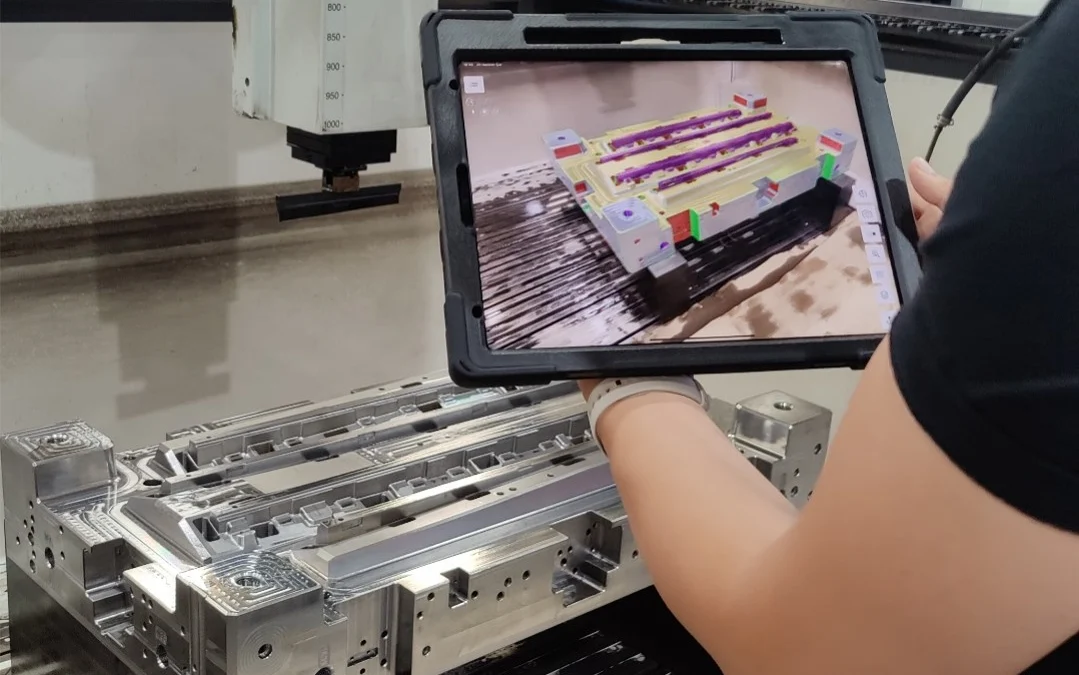
Injection molding quality control is the set of checks that confirms molds, mold components and molded plastic parts match their design intent. It covers mold build and assembly, mold maintenance, production start-up and ongoing part inspection. In general, quality teams combine visual inspection, gauges, coordinate measuring machines and 3D scanning, and each method answers a different question. Visual checks focus on whether features and components are present, complete and in the right place before a mold runs or a part ships.
SuPAR is an augmented reality visual inspection platform for manufacturing. SuPAR overlays CAD data, inspection checkpoints and visual guidance onto the physical mold or part, so your quality team compares the digital reference and the real component in the same view. For injection molding, this helps make mold assembly checks, maintenance reviews and plastic part verification more structured, visual and traceable.
SuPAR Injection Molding
SuPAR streamlines quality control across the injection molding lifecycle — from mold plate geometry verification and assembly guidance to plastic part validation. AR overlay enables rapid detection of geometry deviations, shrinkage issues, and assembly errors.
The condition of the injection mold directly impacts part quality. SuPAR combines virtual CAD overlays with real-time inspection for preventive maintenance, mold assembly guidance, and final part geometry checks — supporting both injection-molded and thermoformed plastic parts.
What does injection molding quality control involve?
Injection molding quality control involves checks at three stages: mold build, mold maintenance and part production.
In general, a mold build requires confirming that inserts, slides, lifters, ejector components and cooling connections are installed as designed. During maintenance, toolmakers review mold plates and moving components for visible conditions, missing elements, and configuration differences that may require further investigation. In production, molded parts are checked for missing clips, bosses, ribs or metal inserts, and for incomplete features.
Properties such as shrinkage and warpage are a separate topic. These are evaluated with dimensional measurement systems, not by visual comparison.
How does AR support injection molding quality control?
AR supports injection molding quality control by placing the CAD model directly over the physical mold or part on a tablet screen.
SuPAR starts in SuPAR Composer, a PC application that imports your existing CAD data. It generates tracking geometry automatically and lets you define inspection checkpoints, annotations and reusable inspection templates.
The SuPAR App runs on a LiDAR-enabled iPad Pro and overlays the nominal CAD geometry onto the physical mold or part using AR tracking. Guided checkpoints lead the inspector through the sequence. Edge comparison visually highlights differences between the CAD reference and the physical component, helping inspectors identify missing, extra, or visibly misaligned features.
How does mold assembly fit into injection molding quality control?
Mold assembly is the first point where injection molding quality control can stop a problem before a single shot.
SuPAR supports mold assembly with AR assembly guidance. Using partial tracking in Composer, you can build step-by-step instructions that show the correct placement and sequence of each component on the physical mold. Each step can carry PDFs, photos and notes, so assemblers and quality engineers work from the same reference.
During and after assembly, the CAD overlay supports visual presence and position verification. Your team can visually verify whether inserts, slides, ejector pins, sleeves, and cooling connections are present and appear in their expected locations relative to the CAD reference. The same approach applies to tool and die buy-off inspection, where a structured visual record helps toolmaker and customer agree on the state of the tool.
How does mold maintenance support injection molding quality control?
Mold maintenance supports injection molding quality control by helping teams verify mold configuration and identify visible conditions or missing features that may require attention before production continues.
With SuPAR, maintenance teams compare the virtual CAD edges with the real edges of a mold plate. This CAD-based visual comparison can help identify expected features that are missing or visibly inconsistent with the digital reference, such as an absent pocket or hole. Ejection components can also be visually verified for presence and expected placement during the same inspection workflow.
Findings are pinned as 3D notes on the model with a photo, comment and symbol. When a toolmaker needs outside input, a Microsoft Teams connection shares the digital twin as a 3D hologram, which supports remote visual inspection without travel.
How are plastic parts checked in injection molding quality control?
Plastic parts are checked in injection molding quality control by comparing each part against its design, first at production start-up and then at defined intervals.
SuPAR overlays the CAD reference onto the molded part so inspectors can visually verify that expected clips, bosses, ribs, holes, and metal inserts are present and appear in their intended locations. This applies to injection molded automotive parts and to thermoformed parts for bus and truck manufacturers. For thermoformed parts, the overlay can support visual verification that attached metal brackets are present and appear in their expected locations relative to the CAD reference. After post-machining, inspectors can visually verify that expected drilled holes and cut-outs are present in the defined areas shown by the CAD reference.
For suitable repetitive targets, SuPAR AI adds automated visual verification modules such as hole verification and presence/absence verification. These run under defined operating conditions, and performance depends on training data, imaging conditions, process variation and validation.
How does design review support injection molding quality control?
Design review supports injection molding quality control by comparing the first physical prototype with its digital model before series tooling is released.
SuPAR overlays the CAD model on the prototype to create a physical versus digital mock-up. Engineering, tooling, and quality teams can review missing features or visible configuration differences together and record observations directly on the 3D model.
What are the limits of AR in injection molding quality control?
AR in injection molding quality control is a visual verification method, and it has clear limits. SuPAR supports visual presence, expected-location, and absence verification against a digital reference.
SuPAR complements, and does not replace, dimensional measurement systems such as CMMs and 3D scanners. Questions about shrinkage, warpage or sink mark depth stay with those systems. SuPAR can display a color map overlay from external scanning data, for example from GOM or CREAFORM systems, and can visualize CT scan data on the physical part. These overlays show results produced elsewhere, so SuPAR acts as a visualization layer for them. The right scope depends on the application and system configuration.
To see how AR fits your mold shop or molding line, request a demo or explore other industries SuPAR supports.
Injection Molding Quality Control FAQ
Does AR substitute for a CMM in injection molding quality control?
- AR in injection molding quality control supports visual presence, expected-location, and absence verification against the CAD reference. SuPAR complements CMMs, gauges and 3D scanning and does not take over their role. Shrinkage, warpage and other dimensional questions remain with measurement systems, while SuPAR can visualize their exported scan data as a color map overlay.
Which CAD formats can SuPAR use for injection molding quality control?
SuPAR Composer imports native CATIA, PTC Creo, Siemens NX, SolidWorks and Inventor files for injection molding quality control. It also supports kernel formats such as Parasolid and ACIS, and neutral formats such as STEP, JT and STL. Further formats are available, so confirm your specific formats during evaluation.
Can SuPAR AI automate parts of injection molding quality control?
SuPAR AI can add automated visual verification for suitable repetitive targets in injection molding quality control, such as holes or component presence. It works under defined operating conditions. Performance depends on training data, imaging conditions, process variation and validation, so each target should be assessed during evaluation.
What hardware does AR injection molding quality control require?
AR injection molding quality control with SuPAR uses a PC for SuPAR Composer and a LiDAR-enabled iPad Pro for the SuPAR App. Composer prepares CAD data and inspection templates. The App overlays the CAD model on the mold or part on the shop floor. Reports open in the free, browser-based SuPAR Web Viewer.
How are findings documented in injection molding quality control with SuPAR?
Findings in injection molding quality control with SuPAR are pinned as 3D notes on the model, each with a photo, comment and symbol. Inspectors can also mark areas with a virtual drawing tool. Results export as PDF, Excel, Word or 3D reports, which reduces dependence on paper-based methods.
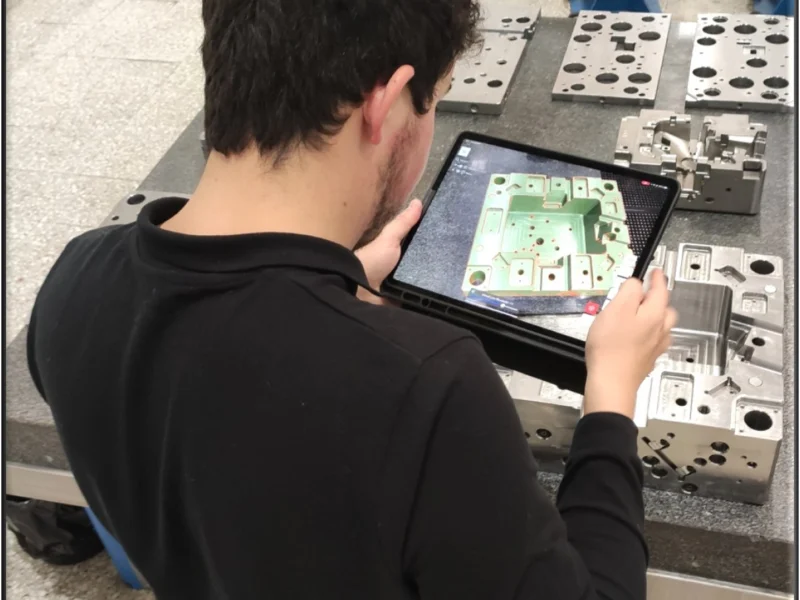
Mold Plate Geometry Check & Maintenance
The condition of the injection mold directly impacts plastic part quality. Combining virtual CAD overlays with real-time inspection makes preventive maintenance faster and more effective. Easily check ejection components, identify out-of-spec parts, and inspect mold hardware.
- Geometry check by comparing virtual CAD edges
- Compare virtual edges (orange) vs actual edges (blue)
- Detect missing or wrong machining operations quickly
- Preventive maintenance for extended tool life
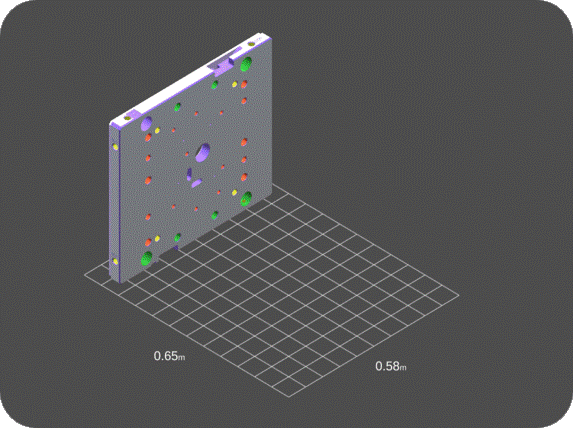
Injection Mold Assembly
Visualize CAD data directly on the physical mold to ensure appearance and installation dimensions comply with assembly drawings. Guide the correct assembly sequence with PDFs, photos, and notes attached to each step.
- Attach PDF, photos, or notes to guide mold assembly order
- Visualize the next part to be assembled
- Verify each part position during assembly
- Improved communication in assembly process
Plastic Parts Geometry Check
Real-time geometry and shrinkage verification on plastic parts during production start-up. Supports both injection-molded parts (automotive) and thermoformed plastic parts (bus and truck manufacturers) with post-machining verification.
- Shrinkage control during production start-up
- Geometry deviation detection
- Sink mark control
- Thermoformed part alignment with metal brackets