SuPAR App – Augmented Reality Quality Inspection
AR-powered visual inspection on the shop floor
Downloads & Resources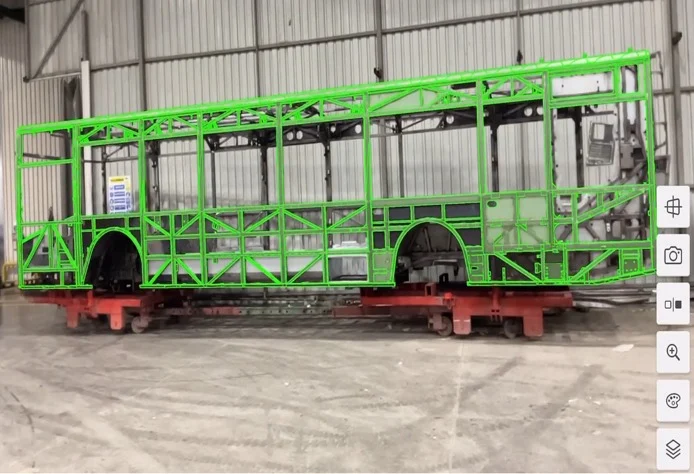
Overview
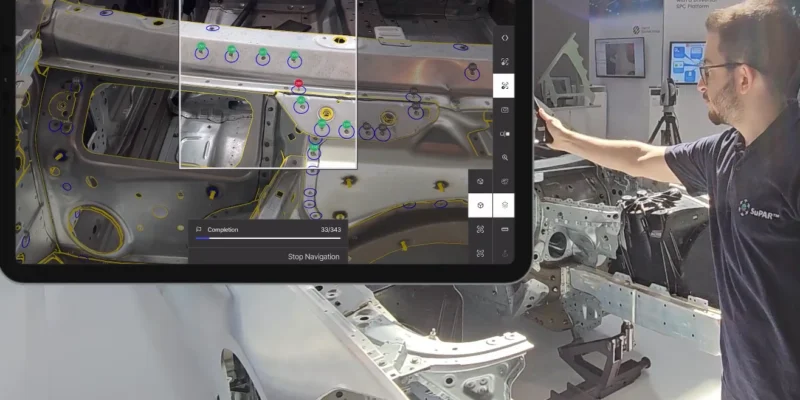
Augmented reality quality inspection means checking a part by overlaying its CAD data onto the physical object through AR, so deviations are visible at a glance. SuPAR App puts exactly that capability on a standard tablet. Point the camera at a part, and SuPAR App overlays your CAD data straight onto the real object missing, extra or misaligned components appear immediately, without repeatedly cross-checking printed drawings or relying solely on manual visual comparison. Depending on part complexity, a check that once took a quality engineer more than an hour can come down to as little as fifteen minutes.
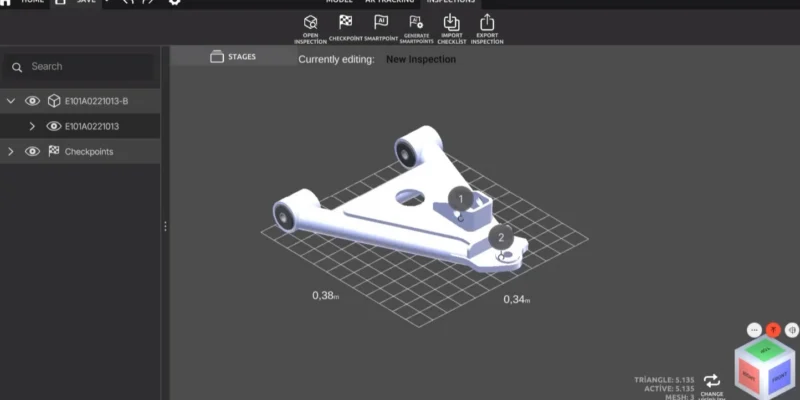
SuPAR App is the field side of an AR-based quality inspection software suite. It reads inspection templates prepared in SuPAR Composer, guides the operator through every checkpoint, records each finding in 3D, and produces a shareable report in seconds.
What augmented reality quality inspection is
Instead of comparing a part to a 2D drawing by hand, augmented reality quality inspection projects the nominal CAD geometry directly onto the real part. SuPAR App matches the model to the physical object using AR tracking and real-time image comparison, and the moment something is out of place, the operator sees it on screen and logs it — defect captured, photographed and commented in a single tap. Because the whole process is digital, there is nothing to transcribe afterwards and nothing to lose.
SuPAR App is built for people on the shop floor, not for CAD specialists. A new operator can run a reliable inspection on day one by following the on-screen guidance.
Augmented reality inspection features
Real-time AR inspection
The nominal CAD geometry and edges are projected onto the physical part. Defects are highlighted in red, conforming areas in green, so the operator’s eye goes straight to what matters. A virtual drawing tool lets the operator mark directly on the component in AR.
AI-assisted target checks
Purpose-built AI modules can automatically check recurring targets such as spot welds, holes and studs. This takes the repetition out of high-volume checks, so operators can focus their attention on judgement calls instead of counting features one by one.
Instant 3D defect recording
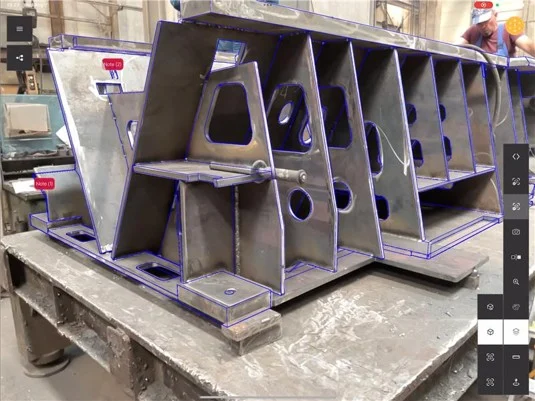
Every finding is pinned as a note point on the 3D model. Attach a photo, add a comment, or drop a predefined symbol — the defect lives on the digital part exactly where it occurred, ready for review by anyone, anywhere.
Reports in seconds PDF, Excel and 3D, Word
When the inspection is done, SuPAR App generates a complete report in PDF, Excel and 3D formats within seconds, with all images and comments included. Excel comment lists are created automatically, so documentation keeps up with the line instead of holding it up.
Augmented reality assembly guidance
Beyond inspection, SuPAR App guides assembly. Using a physical-digital mock-up your CAD model shown in AR over the real workstation it shows operators exactly where each part belongs and in what order. This reduces assembly errors, reinforces the correct build sequence on complex products, and shortens onboarding for new staff.
Communication and remote support
SuPAR App connects to Microsoft Teams and shares the digital twin as a 3D hologram, so a remote expert can review a finding together with the operator in real time. Reports open instantly in SuPAR Web Viewer free, in any browser, with no installation making it effortless to involve suppliers, customers and colleagues.
How the SuPAR inspection workflow works
- Prepare — In SuPAR Composer, import your CAD data, generate the tracking geometry automatically and define the inspection checkpoints. Setup typically takes about fifteen minutes, depending on part complexity.
- Inspect — On a tablet, SuPAR App overlays the model on the real part and walks the operator through each checkpoint, capturing defects in 3D as they go.
- Share — The report is ready in seconds and opens for anyone in SuPAR Web Viewer, directly on the 3D model.
Why teams choose SuPAR App
- Up to 80% less time on inspection and reporting depending on part complexity, a three-hour cycle with 2D drawings can drop to roughly thirty minutes end to end.
- Fewer errors, because defects are caught against the nominal model in real time rather than by manual comparison.
- AI-assisted checks for repetitive targets like spot welds, holes and studs.
- Completely paperless — no forms to fill, no photos to attach by hand, no reports to assemble afterwards.
- Easy for non-specialists, with guided checkpoints and stage-by-stage navigation through complex parts.
- Flexible and mobile — run it in your own plant, at a supplier site or anywhere a part needs checking.
- Remote collaboration built in, so expertise is never limited by location.
Where SuPAR App is used
SuPAR App is at home wherever parts and assemblies need a fast, reliable visual check:
- Body-in-White (BIW) inspection — studs, beads, welding spots and completeness checks
- Incoming and supplier parts inspection
- End-of-line interactive inspection
- Welding and control fixtures — assembly checks and maintenance
- Mould, die and plastic part inspection
- Logistic racks, grippers and handling units
- Welded constructions and large fabricated assemblies
It serves teams across automotive, aerospace and defence, heavy industry, agricultural and construction machinery, energy, mining, and injection moulding.
Built for the shop floor
SuPAR App runs on LiDAR-enabled iPad Pro devices, providing a mobile inspection experience directly on the shop floor. It works alongside SuPAR Composer (on PC) for inspection preparation and SuPAR Web Viewer (free, browser-based) for sharing results one connected workflow from CAD to report.
Frequently asked questions
What is augmented reality quality inspection? It is a method of visual quality control in which CAD data is overlaid onto the physical part through augmented reality. Instead of comparing a part to a 2D drawing by hand, the inspector sees the nominal geometry projected directly onto the real object and spots deviations instantly.
How does SuPAR App detect defects? SuPAR App aligns your CAD model with the real part using AR tracking and real-time image comparison, then highlights missing, extra or misaligned features so the operator can record them on the spot. Purpose-built AI modules can also check recurring targets such as spot welds, holes and studs automatically.
What devices does SuPAR App run on? It runs on standard tablets, with mobile phones also supported — no dedicated inspection hardware required.
What report formats does SuPAR App produce? Inspections are exported as PDF, Excel and 3D reports within seconds, complete with photos and comments.
Do I need to install anything to view a report? No. Reports open for free in SuPAR Web Viewer on any web browser, including mobile, with all photos and notes shown directly on the 3D model.
Can SuPAR App be used as an assembly guide? Yes. Its augmented reality assembly guidance uses a physical-digital mock-up to guide operators through correct part placement and assembly sequence, helping reduce errors and train new staff faster.
How much time can it save? It depends on part complexity, but teams typically cut inspection and reporting time substantially a workflow that took around three hours with 2D drawings can often be completed in about thirty minutes.
Which CAD formats are supported? Inspection data is prepared in SuPAR Composer, which supports a wide range of formats including CATIA, Siemens NX, PTC Creo, SolidWorks, Inventor, STEP, JT, STL and more.
Capabilities
- Real-time AR tracking and visual inspection
- Assisted inspection with edge comparison (green/red)
- Rich annotations: text, photos, 3D notes
- Color map AR overlay from scanning data (GOM, CREAFORM)
- CT scan data visualization for defect analysis
- Remote connection and video conferencing
- Digital reporting: PDF, Word, Excel, 3D
- Instant defect recording in 3D format