
What Is Quality Inspection Software?
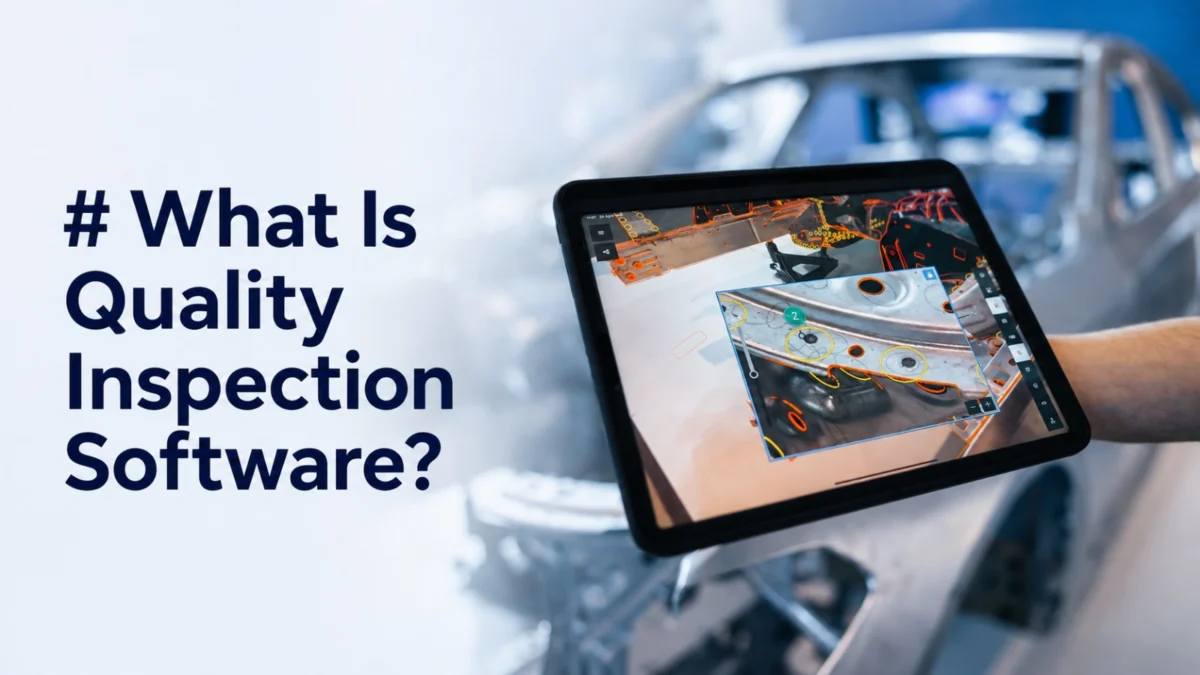
Quality inspection software is a category of manufacturing technology that plans, executes, guides, records, and analyzes product inspection activities. Quality inspection software replaces paper checklists, printed drawings, and manual data entry with structured digital workflows, ensuring every inspector, on every shift, checks the right things in the right order and produces a traceable digital record. Platforms range from basic digital checklists to AI-powered, AR-guided systems operating in real time on the production floor.
Quality inspection software spans a wide range of capabilities and deployment models.
Understanding what quality inspection software does, and what separates a capable platform from a digitized paper form, is essential before beginning an evaluation.
What does quality inspection software do?
Depending on the platform, quality inspection software can support several interconnected functions across the inspection lifecycle.
Inspection plan creation and management: The software stores and manages inspection plans, structured definitions of what to check, where, with what method, and against what acceptance criteria. Plans are derived from engineering data (drawings, CAD models, GD&T specifications) and quality standards (control plans, customer requirements). In advanced platforms such as SuPAR Composer, existing CAD data can be used to prepare structured inspection projects, define checkpoints and annotations, and create reusable inspection templates for the shop floor.
Inspection execution guidance: On the floor, the software guides inspectors step by step, displaying measurement points, pass/fail criteria, reference images, and annotated instructions. Inspector dependence on paper drawings or memory is eliminated.
Result capture and documentation: Pass/fail decisions, measurement values, annotations, and defect photographs are captured digitally as inspections are performed. Manual transcription is eliminated; results are searchable and immediately reportable.
Nonconformance management: When defects are found, the software initiates a documented nonconformance workflow, routing the defect for disposition and tracking corrective actions to closure.
Analytics and reporting: Accumulated inspection data feeds dashboards that reveal trends: which features fail most often, which shifts or operators show higher rejection rates, which suppliers consistently deliver out-of-spec material.
What features should quality inspection software have?
The features that separate a genuinely capable inspection platform from a digitized checklist are specific and consequential.
CAD and engineering data integration: Platforms that work directly with CAD models can reduce the need to recreate inspection references manually and make it easier to prepare visual inspection workflows based on current engineering data.
AR and visual guidance capability: AR quality inspection software can overlay CAD geometry, inspection checkpoints, visual instructions, and pass/fail criteria directly onto physical parts. This AR inspection approach helps operators focus on the correct inspection location while reducing unnecessary switching between the part and separate drawings or documents. SuPAR App brings this capability directly to the production floor.
Offline operation: Shop floors are frequently network-constrained. Software that depends on continuous connectivity can be difficult to use in facilities with limited Wi-Fi or restricted network access. Platforms that cache inspection plans locally and sync results when connectivity is restored are required for production use.
Configurable workflows: Inspection requirements vary by part type, production stage, customer requirement, and defect risk. Software locked into a rigid template structure will require workarounds as product portfolios grow.
QMS and ERP integration: Depending on the platform and integration capabilities, inspection data may be connected with broader QMS, ERP, or corrective-action workflows.
AI-powered defect detection: Advanced quality inspection software can use computer vision and deep learning to automate repetitive visual inspection tasks. SuPAR AI applies this approach to manufacturing with dedicated capabilities for hole detection, spot welding verification, stud inspection, position identification, and absence detection.
How does quality inspection software differ from paper-based inspection?
The limitations of paper-based inspection are well understood by anyone who has run a quality operation on the shop floor.
Consistency: Paper-based inspection depends on each inspector’s interpretation of a drawing or written checklist. Ambiguous instructions are read differently. Steps are skipped under time pressure. Features are checked in different sequences. Quality inspection software standardizes execution, every inspector follows the same procedure, in the same order, against the same criteria.
Speed: Finding the correct drawing revision, locating the valid inspection plan version, recording results on paper, and then transcribing them into a system consumes significant quality labor. Digital inspection software can reduce many of these manual steps by making the relevant inspection information available directly during the inspection process.
Traceability: Paper inspection records require physical storage, are vulnerable to loss and damage, and cannot be queried. Digital records are searchable, immediately available for customer or regulatory audits, and linked to specific parts, production orders, and operators.
Real-time visibility: Paper-based inspection generates results that are visible only after someone collects, transcribes, and reports them, a lag of hours or days. Quality inspection software gives production supervisors and quality managers real-time inspection status and results, enabling same-shift response to emerging problems.
How do deployment models and AR capabilities differ in quality inspection software?
Quality inspection software is available across three primary deployment architectures, each with meaningful tradeoffs.
Cloud-based platforms store data and run application logic on remote servers. Advantages include lower upfront cost, automatic updates, and accessibility from any location with connectivity. The primary constraint in manufacturing is network dependency, cloud-only platforms fail in facilities with poor Wi-Fi or air-gapped environments. Well-designed cloud platforms provide offline modes that cache plans locally and sync results when connectivity is restored.
On-premise platforms run entirely within the facility’s own IT infrastructure. Network dependency is eliminated and data sovereignty requirements, customers or industries that prohibit cloud storage of inspection data, are met. The tradeoff is higher implementation cost, internal IT resource requirements, and limited accessibility outside the facility.
AR-powered platforms are defined not by where data lives but by how inspection is executed. AR delivers inspection guidance through spatial overlay, placing instructions, measurement annotations, and pass/fail criteria directly in the inspector’s field of view, on the physical part. Compatible with both cloud and on-premise architectures, AR inspection reduces the need to switch repeatedly between the physical part and separate screens or documents, helping simplify visual comparison and inspection guidance. SuPAR App combines AR-based inspection with structured inspection templates prepared from CAD data in SuPAR Composer.
How are AI and AR transforming quality inspection software?
The next generation of quality inspection software is defined by the convergence of AI and augmented reality.
AI extends what inspection software can detect. Traditional software guides inspectors through checks performed by human eyes and judgment. AI-enhanced platforms perform the detection, computer vision models trained on specific parts and defect types identify surface anomalies, missing or incorrectly positioned features, and recurring assembly targets. Inspection scales beyond human speed limits and fatigue effects that degrade accuracy over time.
AR transforms how inspection is experienced. The interface is no longer a separate screen, it is integrated into the inspector’s view of the physical part. As AR hardware and mobile inspection technologies evolve, visual inspection interfaces are becoming increasingly integrated with the physical inspection environment.
The combination, AI-powered automated inspection where it delivers efficiency, AR-guided manual inspection where human judgment remains essential, with a unified data layer connecting both, defines the direction the category is moving.
Frequently Asked Questions
Is quality inspection software the same as a quality management system?
No, they are related but distinct categories. A quality management system (QMS) manages the full quality ecosystem: document control, audits, CAPA, training records, supplier quality, and compliance management. Quality inspection software is a specialized tool focused on executing and recording product inspection activities on the shop floor. Many organizations use both systems, with inspection data potentially connected to broader QMS workflows through available integrations.
Can quality inspection software work without internet on the shop floor?
Yes, platforms designed for manufacturing environments treat offline operation as a core requirement, not an afterthought. Inspection plans, reference data, and result templates are cached locally on the inspection device. Complete inspection routines are performed without network connectivity, and results sync to the central system when connectivity is restored. Verify this capability explicitly during evaluation, offline mode quality and feature coverage varies significantly between platforms.
How does AR quality inspection software differ from standard inspection apps?
Standard inspection apps present instructions on a screen. The inspector reads the step, looks at the physical part, and mentally translates 2D instructions to 3D reality. AR inspection software reduces this mental translation by overlaying digital inspection information directly onto the physical part. The inspector sees both simultaneously. This reduces cognitive load, decreases the rate of checking the wrong location, and anchors step-by-step guidance spatially to the feature being checked rather than to text on a separate screen.
What file formats does quality inspection software typically support?
Capable platforms support STEP and IGES for CAD geometry, native formats from major CAD platforms (CATIA, SolidWorks, NX, Creo), PDF and DXF for drawings, CSV and Excel for tolerance data imports, and XML or JSON for QMS and ERP integration. For output and result data, most platforms produce PDF and Excel reports with API-based integration to quality systems. During evaluation, test actual import of your specific CAD and drawing formats, theoretical format support and practical import reliability do not always match.
How long does quality inspection software implementation take?
Implementation time varies depending on the software, number of parts or inspection projects, required integrations, and the complexity of existing quality workflows. CAD-driven platforms can reduce preparation effort by allowing teams to reuse existing engineering data rather than recreating inspection references manually. For SuPAR, once an inspection project has been prepared in Composer, the inspection setup itself can be completed quickly on the shop floor.