
Augmented Reality in Manufacturing: Use Cases and Benefits
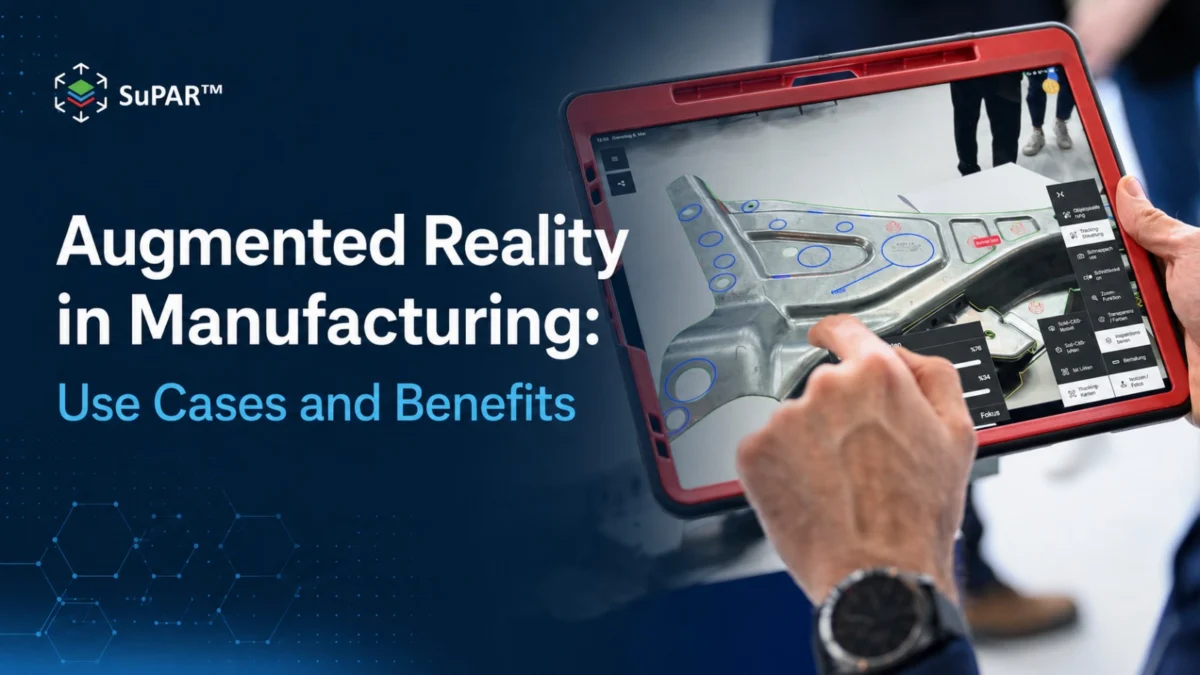
Augmented reality in manufacturing is the use of AR technology to overlay digital information, including CAD geometry, inspection checkpoints, work instructions, and visual annotations, directly onto physical parts, assemblies, and workspaces. The digital information appears superimposed on the real environment through an AR-capable device such as a tablet or headset, allowing operators to see both the physical object and the relevant digital guidance at the same time.
Augmented reality in manufacturing is applied across several operational areas, with quality inspection and assembly guidance among its key industrial use cases. The core value in both cases is the same: reducing the gap between digital reference information and physical work execution, and making that information available in the right place, at the right time, in a format that operators can act on without switching their attention to a separate screen or document.
How does augmented reality work on the shop floor?
Augmented reality on the manufacturing shop floor works through a three-stage process: localization, overlay, and capture.
Localization: The AR device identifies the position and orientation of the physical part or workspace relative to the device’s camera. This is typically achieved using CAD model tracking, marker-based tracking, or a combination of both. Once localized, the system can align digital content to the physical object.
Overlay: Digital content, including CAD geometry, inspection annotations, pass/fail criteria, and work instruction steps, is rendered over the live camera view. The operator sees the physical part with the digital information superimposed on it in the correct position and orientation. When the device or the part moves, the overlay adjusts continuously to maintain alignment.
Capture: As the operator follows the AR-guided workflow, results, photographs, and annotations are captured digitally at each step. This creates a traceable record of what was inspected or assembled, by whom, and with what outcome.
SuPAR Composer is used to prepare the structured inspection and guidance content, importing CAD data and defining the checkpoints, annotations, and sequence that operators follow. SuPAR App delivers that content on the shop floor, overlaying it onto the physical part and capturing the results.
What are the quality inspection use cases for AR in manufacturing?
Augmented reality visual inspection is a key AR use case in manufacturing quality. The fundamental problem it addresses is the translation gap: traditional inspection requires operators to mentally convert 2D drawings or digital documents into checks on a 3D physical part. This translation process can introduce interpretation differences between operators and contribute to inspection variability.
AR inspection addresses this by placing the inspection information directly on the feature being checked. The operator sees the nominal CAD geometry over the physical component, along with checkpoints, acceptance criteria, and reference annotations. Key quality inspection use cases include:
Assembly verification: Checking that all required components are present, correctly positioned, and correctly installed. AR overlay places a visual reference at each assembly location, making it easier to identify missing, extra, or misaligned features.
Weld point verification: Visually verifying the presence and expected placement of spot welds, studs, and other joining elements by overlaying CAD-based reference information onto the physical assembly. SuPAR AI can complement AR-guided inspection by supporting automated visual verification of defined and repetitive inspection targets.
Visual position verification: Using the CAD reference to visually verify whether defined features, holes, brackets, or components appear in their expected locations. AR overlay supports direct visual comparison between the digital reference and the physical part; it does not replace dimensional measurement, tolerance verification, or metrology where these are required.
Final assembly audit: Conducting a structured end-of-line audit using a predefined inspection sequence, with AR guiding the operator through each checkpoint and capturing digital evidence of each result.
How does augmented reality support assembly guidance and work instructions?
Augmented reality in manufacturing is also applied to assembly guidance: delivering work instructions to operators at the point of assembly rather than through printed manuals or separate screen-based systems.
In assembly guidance applications, AR overlays show operators what to assemble next, where each component goes, in what orientation, and in what sequence. This is particularly valuable for:
- Complex assemblies with many variants or configurations
- Low-volume or high-mix production where operators work on different assemblies infrequently
- Assembly steps with a high risk of error in component position or orientation
- Training new operators on assembly procedures
The difference between AR assembly guidance and a printed work instruction or screen-based procedure is that the information is placed in the operator’s field of view, at the location where the work is being done. This reduces the need to look away from the work, reference a separate document, and re-locate the relevant instruction.
AR-guided workflows can also support digital documentation by capturing relevant results and annotations during the process, reducing reliance on separate manual documentation.
How does AR inspection compare to traditional inspection methods?
Traditional manufacturing inspection relies on paper drawings, printed inspection checklists, or screen-based digital documents as the reference material. Operators compare what they see on the part against what is described in the documentation.
This approach has well-known limitations. Interpretation variability between operators can lead to inconsistent results. The translation from 2D document to 3D physical part creates opportunities for error. Inspection records must be created manually, introducing documentation burden and the risk of transcription errors.
| Dimension | Traditional Inspection | AR-Guided Inspection |
| Reference material | Paper drawing or screen | CAD overlay on physical part |
| Information location | Separate from the work | At the feature being checked |
| Operator interpretation | Required for each step | Reduced by spatial overlay |
| Documentation | Manual, post-inspection | Digital, captured during inspection |
| Consistency across operators | Depends on training | Supported by standardized template |
| CAD data requirement | Not required | Required for template preparation |
AR-guided inspection reduces dependence on operator interpretation by placing the reference information at the correct location on the physical part. This can help reduce inspection variability and support more consistent execution across operators and shifts. The digital record created during AR inspection also supports traceability requirements without adding manual documentation steps.
How do you implement augmented reality in manufacturing?
Implementing augmented reality in manufacturing for inspection or assembly guidance involves several steps:
Identify the use case: Define which inspection activities or assembly processes are the highest-priority candidates for AR implementation. Processes with high inspection variability, complex part geometries, or significant documentation burden are good starting points.
Confirm CAD data availability: CAD-based AR inspection and assembly guidance workflows, such as those used with SuPAR, require suitable CAD models of the parts or assemblies being inspected or assembled. CAD data quality and completeness directly affects the quality of the AR overlay.
Prepare inspection or guidance content: Using SuPAR Composer, quality teams import CAD data and define the inspection checkpoints, visual annotations, and sequences for each product. This preparation step produces the inspection templates that operators use on the shop floor.
Select hardware: SuPAR App runs on iPad Pro, which provides the camera and display capabilities required for AR overlay and result capture. Hardware selection should account for the physical environment, ergonomics, and any requirements for water or dust resistance.
Train operators: Operators need to be trained on the AR inspection workflow, including how to localize the part, follow the inspection sequence, and capture results at each checkpoint.
Review and iterate: Initial deployment often reveals opportunities to refine the inspection template, adjust camera positioning, or modify the inspection sequence. A structured review after the first production runs helps optimize the workflow before broader rollout.
Frequently Asked Questions
What hardware is needed for augmented reality in manufacturing?
AR inspection in manufacturing typically runs on tablet hardware. SuPAR App is designed for iPad Pro, which provides the camera quality, processing capability, and display needed for CAD model tracking and AR overlay. Headset-based AR is also available in some industrial applications, offering hands-free operation. The appropriate hardware depends on the inspection task, the physical environment, and ergonomic requirements. CAD data is required for content preparation, which is done in SuPAR Composer.
Can augmented reality reduce inspection time in manufacturing?
AR inspection can help reduce the time required for structured visual inspection by delivering inspection guidance directly at the feature being checked, reducing the need to locate instructions in a separate document, identify the correct feature, and record results manually. The degree of time reduction depends on the complexity of the inspection process, the quality of the inspection template, and how well the AR workflow is adapted to the specific production environment.
Does SuPAR require CAD data for AR-guided inspection?
Yes. SuPAR’s AR-guided inspection workflow uses existing CAD data as the digital reference for tracking, visual overlay, and inspection preparation. CAD models are prepared in SuPAR Composer and then used by SuPAR App to support CAD-to-physical visual comparison on the shop floor. If suitable CAD data is not available, SuPAR’s CAD-based AR inspection workflow cannot be used in the same way.
What industries are leading the adoption of augmented reality in manufacturing?
Automotive manufacturing is one of the sectors where AR inspection is actively applied, given the inspection volumes, complex assemblies, and demanding quality standards characteristic of body-in-white, powertrain, and final assembly operations. Transportation, aerospace, and heavy manufacturing also apply AR inspection for large and complex assemblies where inspection guidance and traceability are particularly important. Customers such as Otokar have used SuPAR App for AR-guided fixture inspection and assembly verification in vehicle manufacturing.
How does augmented reality inspection support digital quality documentation?
AR inspection can support digital quality documentation by capturing inspection findings, photographs, annotations, and results during the inspection process. SuPAR supports digital reporting in formats including PDF, Word, Excel, and 3D, allowing inspection information to be reviewed and shared with relevant quality teams. Any direct integration with QMS, ERP, CAPA, or other enterprise systems should be evaluated separately according to the specific implementation requirements.